• Home
  • About
  • Contact
Finacle Solution
  • Home
  • Finacle Menu
  • _APY PMSBY PMJJY
  • _MIS
  • _NSS
  • _KVP/NSC
  • _PPF
  • _SiteMap
  • _RD
  • 150+Commands
  • Finacle Command
  • _I/O Clearing
  • _SSA
  • _SCSS
  • _TD
  • _SB
  • CSI
  • Forms

Latest Post

6/recent/ticker-posts
HomePPFPPF ''Transfer In'' from Bank to CBS Post office

PPF ''Transfer In'' from Bank to CBS Post office

Admin Wednesday, December 30, 2015

PPF ''Transfer In'' from Bank to CBS Post office.


The PPF transfer in Process will be adopted for below two cases.

  • If account is transferred from Bank to CBS Post office. 
  • If account is migrated with wrong open date. In this situation first do zero inteset for account and close it.

PPF – Transfer In Process


  • Create CIF ID if already not available.
  • Menu Shortcut - CPPFAO
  • Function Code - Open
  • CIF ID - Required CIF
  • GO


    • After GO the following Screen Appear 


    • A/c Opening Date - 
    • Mode of operation - 
    • Account Document Received- Yes 
    • PPF Maturity Date - 
    • Account Opening Mode - Transfer 
    • Old PPF Account Number - 
    • Old PPF Bank Branch Detail - 
    • A.T. Number - 
    • Document Detail - 
    • Nomination Detail - 
    • GO 
    • Verify the account opening using CPPFAV menu in Supervisor login. 
    • The text file has to be generated from the excel sheet (Use download button for getting excel sheet at last of this post). Excel sheet should contain all the transactions of the PPF account and the balance should be checked. 
    • The field 'Financial Year End Balance Identifier' should be selected as YES only for the last transaction of a financial year. For all other transactions, it should be selected as NO. 
    • The fields 'Transaction Date' / 'Value Date' should be in mm/dd/yyyy format only. 
    • Do not change the account no. of this file because there is no need of its change required and click on Generate File button to generate the text file. Excel template is attached with this mail. 
    • In Counter PA login, select HTRFTOUN menu. Select the text file generated. In 'Destination Directory' field, give /dop 
    • The following screen appears 


        • The message 'File uploaded successfully' will be displayed. 


        • Then, select CTUPLD menu. Enter the account number and then enter the file name ( TRFRINDET-3000365919.TXT). The message 'Data uploaded successfully' will be displayed. 
        • The following screen appears 


          • After this process, login as Supervisor and select CTPROC menu. Select 'Verify' and enter the account number. Transactions will be displayed. Click on SUBMIT. 
          • The following screen appears 


            • Again login as PA and select CTPROC menu. Select 'Process' and enter the account number. Transactions will be displayed. Click on SUBMIT. A screen showing the transaction id details will be displayed.

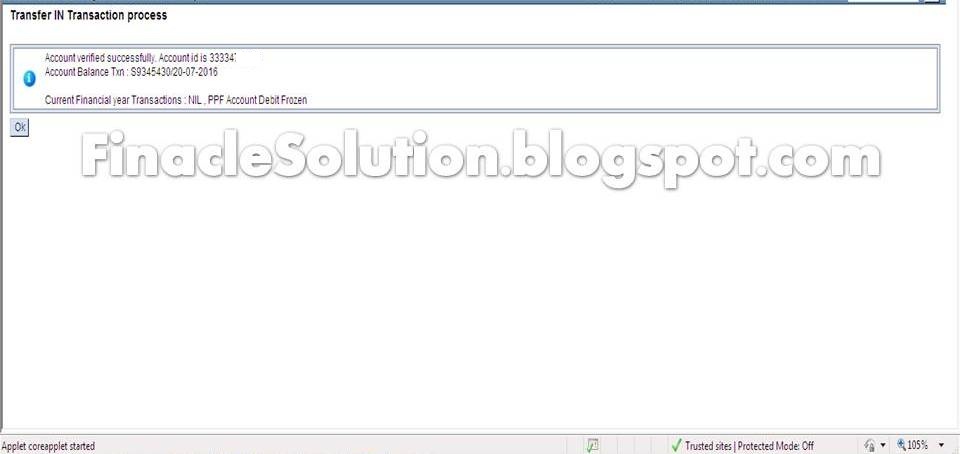


              • Then, check the current year transactions in HACLI menu and previous year transactions in CTINQ menu. 
              • Download PPFTRIN file from given icon

              • Before creating the text file, the date format of the system should be changed as mm/dd/yyyy. 
              • Open PPFTranIn file and enable the content of security before data entry as shown in images. 

                PPF public provident fund

                You may like these posts

                Post a Comment

                3 Comments

                1. Unknown21 April 2018 at 12:20

                  Password for this excel sheet

                  ReplyDelete
                  Replies
                    Reply
                2. lakshmiganesh6 March 2019 at 12:59

                  While uploafing the file pls remove the slash error occurs any solution

                  ReplyDelete
                  Replies
                    Reply
                3. Unknown30 July 2019 at 13:24

                  Pls share the password for the excel sheet

                  ReplyDelete
                  Replies
                    Reply
                Add comment
                Load more...

                Search

                Most Popular

                Tags

                • Android App
                • APY
                • atal pension yojna
                • ATM
                • Auditor
                • Bonus
                • Branch Office
                • CBS BCP
                • CCS(CCA) Rules - 1965
                • CCS(Conduct) Rule-1964
                • Certificates
                • Cheque Book
                • CIF
                • Claim Closure
                • Clearing
                • Constitution of India
                • core system integrator
                • CSI
                • DA Order
                • Demonetization
                • DOP Agent
                • DOP News
                • DOP Order
                • DOPT Order
                • EOD
                • Errors
                • Extension/Renewal
                • FinacleSetting
                • Fmenu
                • Govt Orders
                • Gramin Dak Sevak
                • Gratuity
                • Group B
                • IncomeTax
                • India Post Payment Bank
                • Indian Railways
                • Internet Banking
                • Inventory
                • IPO Exam
                • ippb
                • KVS
                • latest job
                • Loan
                • McCamish
                • MENU
                • MIS
                • monthly income scheme
                • nsckvp
                • NSS
                • Office Account
                • Others
                • Passbook Printer
                • Pension
                • PMJJBY
                • pmjjby scheme
                • PMSBY
                • pmsby scheme
                • Pofinacleguide
                • PPF
                • public provident fund
                • RD
                • Recruitment
                • RICT
                • RTI Act 2005
                • Sandes App
                • saving bank
                • SB
                • SB Order
                • SCSS
                • senior citizen saving scheme
                • SGB
                • Social Security Schemes
                • SQL
                • SSA
                • SSC
                • SystemAdmin
                • TD
                • term deposit
                • Tricks & Tips
                • Unverified Tran
                • WOS Currency Note

                Statics

                Contact Form

                Name

                Email *

                Message *

                Subscribe

                Get All The Latest Updates Delivered Straight Into Your Inbox For Free!

                Finacle Solution

                A complete and latest guide about Finacle ver 10. It is basically written on DOP Finacle used in India Post. It explains all latest changes and solution of Finacle. Finacle solution consists all Finacle Menu and command and explains how to use them with relevant screen shoots.

                Footer Menu Widget

                • Home
                • About
                • Contact Us
                Crafted with by TemplatesYard | Distributed By Gooyaabi Templates